Saving your results in MPQP
This notebook demonstrates how to manage quantum circuit execution results using the mpqp library.
You can basically skip the first cell which sets up the database so that is does not interfere with any of your previous work. In case you are interested in this topic, you can dive deeper using the documentation of the corresponding section.
[1]:
from mpqp import QCircuit, run, IBMDevice, GOOGLEDevice, Result, BatchResult, JobType, BasisMeasure, CNOT, H
from mpqp.environment.env_manager import get_env_variable, save_env_variable


# Backing up your local storage to avoid losing any of your data
from mpqp.local_storage import setup_local_storage, clear_local_storage

old_db_path = get_env_variable("DB_PATH")
setup_local_storage("example_db_for_notebook.db")
clear_local_storage()
After execution of a circuit, you might want to save your result for later use. Here is how you would do it:
We create a simple quantum circuit using gates and run it on a simulator. We can then store the results in the local storage.
By default if a job already exists the result will put the same job_id it can be change by setup compile_same_job args in insert_result to false.
[2]:
c = QCircuit([H(0), CNOT(0, 1), BasisMeasure()])

result = run(c, device=IBMDevice.AER_SIMULATOR)

id = result.save()
print(id)
1
At a latter date, when you need this result, you can retrieve it by it’s id as such:
[3]:
result = Result.load_by_local_id(1)
print(result)
Result: IBMDevice, AER_SIMULATOR
  Counts: [504, 0, 0, 520]
  Probabilities: [0.49219, 0, 0, 0.50781]
  Samples:
    State: 00, Index: 0, Count: 504, Probability: 0.4921875
    State: 11, Index: 3, Count: 520, Probability: 0.5078125
  Error: None
Of course this can also be done with a batch result:
[4]:
run(c, device=[IBMDevice.AER_SIMULATOR, GOOGLEDevice.CIRQ_LOCAL_SIMULATOR]).save()
print(id)
...
BatchResult.load_by_local_ids([2,3]).plot()
1
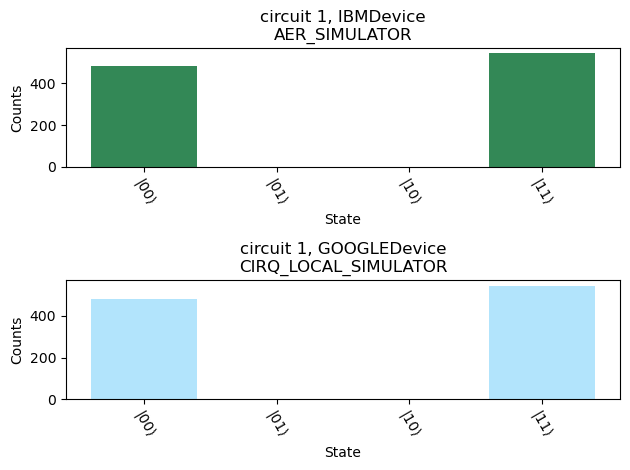
One might also not have saved the ids, you can then load all the results, or load results similar to one you know should be close to the one you’re looking for:
[5]:
print("All results:")
for r in Result.load_all(): print(r)

r = Result.load_all()[0]
print("\nOr results similar to a specific result:")
print(r.load_similar())
All results:
Result: IBMDevice, AER_SIMULATOR
  Counts: [504, 0, 0, 520]
  Probabilities: [0.49219, 0, 0, 0.50781]
  Samples:
    State: 00, Index: 0, Count: 504, Probability: 0.4921875
    State: 11, Index: 3, Count: 520, Probability: 0.5078125
  Error: None
Result: circuit 1, IBMDevice, AER_SIMULATOR
  Counts: [481, 0, 0, 543]
  Probabilities: [0.46973, 0, 0, 0.53027]
  Samples:
    State: 00, Index: 0, Count: 481, Probability: 0.4697266
    State: 11, Index: 3, Count: 543, Probability: 0.5302734
  Error: None
Result: circuit 1, GOOGLEDevice, CIRQ_LOCAL_SIMULATOR
  Counts: [481, 0, 0, 543]
  Probabilities: [0.46973, 0, 0, 0.53027]
  Samples:
    State: 00, Index: 0, Count: 481, Probability: 0.4697266
    State: 11, Index: 3, Count: 543, Probability: 0.5302734
  Error: None

Or results similar to a specific result:
[Result(Job(JobType.SAMPLE, QCircuit([H(0), CNOT(0, 1), BasisMeasure()]), IBMDevice.AER_SIMULATOR), [Sample(2, index=0, count=504, probability=0.4921875), Sample(2, index=3, count=520, probability=0.5078125)], None, 1024)]
But of course you can still filter by custom filter:
[6]:
sample_results = [r for r in Result.load_all() if r.job.job_type == JobType.SAMPLE]
for r in sample_results: print(r)
Result: IBMDevice, AER_SIMULATOR
  Counts: [504, 0, 0, 520]
  Probabilities: [0.49219, 0, 0, 0.50781]
  Samples:
    State: 00, Index: 0, Count: 504, Probability: 0.4921875
    State: 11, Index: 3, Count: 520, Probability: 0.5078125
  Error: None
Result: circuit 1, IBMDevice, AER_SIMULATOR
  Counts: [481, 0, 0, 543]
  Probabilities: [0.46973, 0, 0, 0.53027]
  Samples:
    State: 00, Index: 0, Count: 481, Probability: 0.4697266
    State: 11, Index: 3, Count: 543, Probability: 0.5302734
  Error: None
Result: circuit 1, GOOGLEDevice, CIRQ_LOCAL_SIMULATOR
  Counts: [481, 0, 0, 543]
  Probabilities: [0.46973, 0, 0, 0.53027]
  Samples:
    State: 00, Index: 0, Count: 481, Probability: 0.4697266
    State: 11, Index: 3, Count: 543, Probability: 0.5302734
  Error: None
Results can also be deleted once you no longer them:
[7]:
Result.delete_by_local_id(1)
All of these methods have an equivalent for jobs, where you can save, load et delete your jobs.
Now that you know how to use your result local storage, let us revert it to it’s previous state.
[8]:
clear_local_storage()
save_env_variable("DB_PATH", old_db_path)
[8]:
True